Capacity Pool Allocation
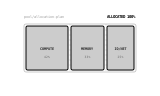
CSSA master system resource pool is sequentially partitioned into three calibrated compute, memory, and IO blocks sliding into designated allocation slots.
- Tier
- CSS
- Dependencies
- None
- Duration
- 7.3 s, loops
- Categories
- Data and progress
- Use cases
- Dashboards and reporting, Automation and rules
- Industries
- IT services and infrastructure, Cross-industry
- Style
- Data mark · regular stroke
- Set
- capacity
- Tags
- loopgeometricbarsui
Companion assets
The same artwork, not animated. Derived from the entry’s own resting state, so it matches exactly.
Code
animation.svg
<svg xmlns="http://www.w3.org/2000/svg" aria-labelledby="capacity-allocation-title" class="pulsar pulsar-capacity-allocation" data-pulsar="capacity-allocation" role="img" viewBox="0 0 160 96"><title id="capacity-allocation-title">Master resource pool subdividing into three calibrated partition blocks sliding sequentially into place</title><rect width="112" height="48" x="24" y="24" fill="none" stroke="currentColor" stroke-width=".8" opacity=".25" rx="2"></rect><g fill="none" stroke="currentColor" stroke-dasharray="2 3" stroke-width=".5" opacity=".2"><line x1="70" x2="70" y1="24" y2="72"></line><line x1="106" x2="106" y1="24" y2="72"></line></g><g id="capacity-allocation-b1"><rect width="42" height="44" x="26" y="26" fill="currentColor" opacity=".2" rx="1.5"></rect><rect width="42" height="44" x="26" y="26" fill="none" stroke="currentColor" rx="1.5"></rect><text x="47" y="50" fill="currentColor" font-family="monospace" font-size="3.5" font-weight="700" opacity=".8" text-anchor="middle">COMPUTE</text><text x="47" y="58" fill="currentColor" font-family="monospace" font-size="3" opacity=".5" text-anchor="middle">42%</text></g><g id="capacity-allocation-b2"><rect width="33" height="44" x="71" y="26" fill="currentColor" opacity=".2" rx="1.5"></rect><rect width="33" height="44" x="71" y="26" fill="none" stroke="currentColor" rx="1.5"></rect><text x="87.5" y="50" fill="currentColor" font-family="monospace" font-size="3.5" font-weight="700" opacity=".8" text-anchor="middle">MEMORY</text><text x="87.5" y="58" fill="currentColor" font-family="monospace" font-size="3" opacity=".5" text-anchor="middle">33%</text></g><g id="capacity-allocation-b3"><rect width="27" height="44" x="107" y="26" fill="currentColor" opacity=".2" rx="1.5"></rect><rect width="27" height="44" x="107" y="26" fill="none" stroke="currentColor" rx="1.5"></rect><text x="120.5" y="50" fill="currentColor" font-family="monospace" font-size="3.5" font-weight="700" opacity=".8" text-anchor="middle">IO/NET</text><text x="120.5" y="58" fill="currentColor" font-family="monospace" font-size="3" opacity=".5" text-anchor="middle">25%</text></g><g fill="currentColor" font-family="monospace"><text x="24" y="18" font-size="3.5" opacity=".4">pool/allocation-plan</text><text id="capacity-allocation-status" x="136" y="18" font-size="4" font-weight="700" opacity=".9" text-anchor="end">ALLOCATED 100%</text></g></svg>
animation.css
.pulsar-capacity-allocation {
  --pulsar-accent: currentColor;
}

.pulsar-capacity-allocation #capacity-allocation-b1 rect:last-of-type,
.pulsar-capacity-allocation #capacity-allocation-b2 rect:last-of-type,
.pulsar-capacity-allocation #capacity-allocation-b3 rect:last-of-type {
  stroke: var(--pulsar-accent, currentColor);
}

.pulsar-capacity-allocation #capacity-allocation-b1 rect:first-of-type,
.pulsar-capacity-allocation #capacity-allocation-status {
  fill: var(--pulsar-accent, currentColor);
}

.pulsar-capacity-allocation #capacity-allocation-b1 {
  animation: capacity-allocation-slide 6000ms 300ms cubic-bezier(0.16, 1, 0.3, 1) infinite;
}

.pulsar-capacity-allocation #capacity-allocation-b2 {
  animation: capacity-allocation-slide 6000ms 800ms cubic-bezier(0.16, 1, 0.3, 1) infinite;
}

.pulsar-capacity-allocation #capacity-allocation-b3 {
  animation: capacity-allocation-slide 6000ms 1300ms cubic-bezier(0.16, 1, 0.3, 1) infinite;
}

@keyframes capacity-allocation-slide {
  0% {
    transform: translateY(-24px);
    opacity: 0;
  }
  25%,
  75% {
    transform: translateY(0);
    opacity: 1;
  }
  90%,
  100% {
    transform: translateY(-24px);
    opacity: 0;
  }
}

.pulsar-capacity-allocation #capacity-allocation-status {
  animation: capacity-allocation-txt 6000ms ease-in-out infinite;
}

@keyframes capacity-allocation-txt {
  0%,
  30% {
    opacity: 0.4;
  }
  50%,
  75% {
    opacity: 1;
  }
  90%,
  100% {
    opacity: 0.4;
  }
}

@media (prefers-reduced-motion: reduce) {
  .pulsar-capacity-allocation * {
    animation: none !important;
  }
  .pulsar-capacity-allocation #capacity-allocation-b1,
  .pulsar-capacity-allocation #capacity-allocation-b2,
  .pulsar-capacity-allocation #capacity-allocation-b3 {
    transform: translateY(0);
    opacity: 1;
  }
  .pulsar-capacity-allocation #capacity-allocation-status {
    opacity: 1;
  }
}
From this family15 in Capacity
See the familyCapacity Burst Usage
Capacity Resource Exhaustion
Capacity Vernier Gauge
Capacity Margin Headroom
Capacity Level Column
Capacity Linear Meter
Capacity Storage Overflow
Capacity Peak Watermark
Capacity Memory Pressure
Capacity Discrete Quota
Capacity Dynamic Scale
Capacity Threshold Alert
Capacity Categorical Usage