Level Change
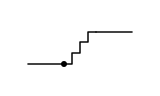
CSSSplit floorplate platform datums connect through an architectural stair flight indicating vertical level shifts.
- Tier
- CSS
- Dependencies
- None
- Duration
- 4 s, loops
- Categories
- Icons and micro-interactions
- Use cases
- Determinate progress, Navigation and wayfinding
- Industries
- Real estate and property, Construction and built environment
- Style
- Technical · light stroke
- Set
- floorplate
- Tags
- lineminimalloopprogress
Companion assets
The same artwork, not animated. Derived from the entry’s own resting state, so it matches exactly.
Code
animation.svg
<svg xmlns="http://www.w3.org/2000/svg" fill="none" aria-hidden="true" class="pulsar pulsar-floorplate-elevation" data-pulsar="floorplate-elevation" viewBox="0 0 160 96"><line x1="28" x2="64" y1="64" y2="64" stroke="currentColor" stroke-linecap="round" stroke-width="1.5" class="plat-low"></line><line x1="96" x2="132" y1="32" y2="32" stroke="currentColor" stroke-linecap="round" stroke-width="1.5" class="plat-high"></line><path stroke="var(--pulsar-accent, currentColor)" stroke-linecap="round" stroke-linejoin="round" stroke-width="1.5" d="M64 64h8V53h8V42h8V32h8" class="flight"></path><circle cx="64" cy="64" r="3" fill="var(--pulsar-accent, currentColor)" class="walker"></circle></svg>
animation.css
.pulsar-floorplate-elevation {
  display: block;
  width: 100%;
  height: 100%;
}
.pulsar-floorplate-elevation .walker {
  animation: floorplate-elevation-climb 4s ease-in-out infinite;
}
.pulsar-floorplate-elevation .flight {
  animation: floorplate-elevation-flight 4s ease-in-out infinite;
}
@keyframes floorplate-elevation-climb {
  0% {
    transform: translate(0, 0);
    opacity: 0.2;
  }
  20% {
    transform: translate(0, 0);
    opacity: 1;
  }
  80% {
    transform: translate(32px, -32px);
    opacity: 1;
  }
  100% {
    transform: translate(32px, -32px);
    opacity: 0.2;
  }
}
@keyframes floorplate-elevation-flight {
  0%,
  100% {
    opacity: 0.4;
  }
  50% {
    opacity: 1;
  }
}
@media (prefers-reduced-motion: reduce) {
  .pulsar-floorplate-elevation .walker,
  .pulsar-floorplate-elevation .flight {
    animation: none;
    transform: none;
    opacity: 1;
  }
}